USB Bridge

Remote USB access

Bridge Your Devices.
Connect Without Limits.

Access USB devices from another computer as if they were plugged in locally. USB Bridge creates a secure connection between your computers, giving you remote access to USB devices across the room or across the world.

  • Secure connections
  • Simple setup
  • Remote USB access
USB Bridge — Connect · Share · Control

Powerful. Flexible. Secure.

Your USB Devices.
Available Where You Need Them.

Remote USB Access

Connect to USB devices attached to another computer and use them remotely.

Local or Remote

Connect computers across the room, across your network, or across the internet.

Multi-PC Management

Sign in once to see your computers, available devices, and active connections.

Secure by Design

Account-controlled access with protected connections and granular device control.

Works with the USB devices you already use

  • Storage
  • Webcams
  • Printers
  • Controllers
  • HID Devices
  • Audio
  • Specialized Hardware

The USB Bridge app

Everything in one place.

See your computers, discover available USB devices, share a device, and monitor your connection from one streamlined interface.
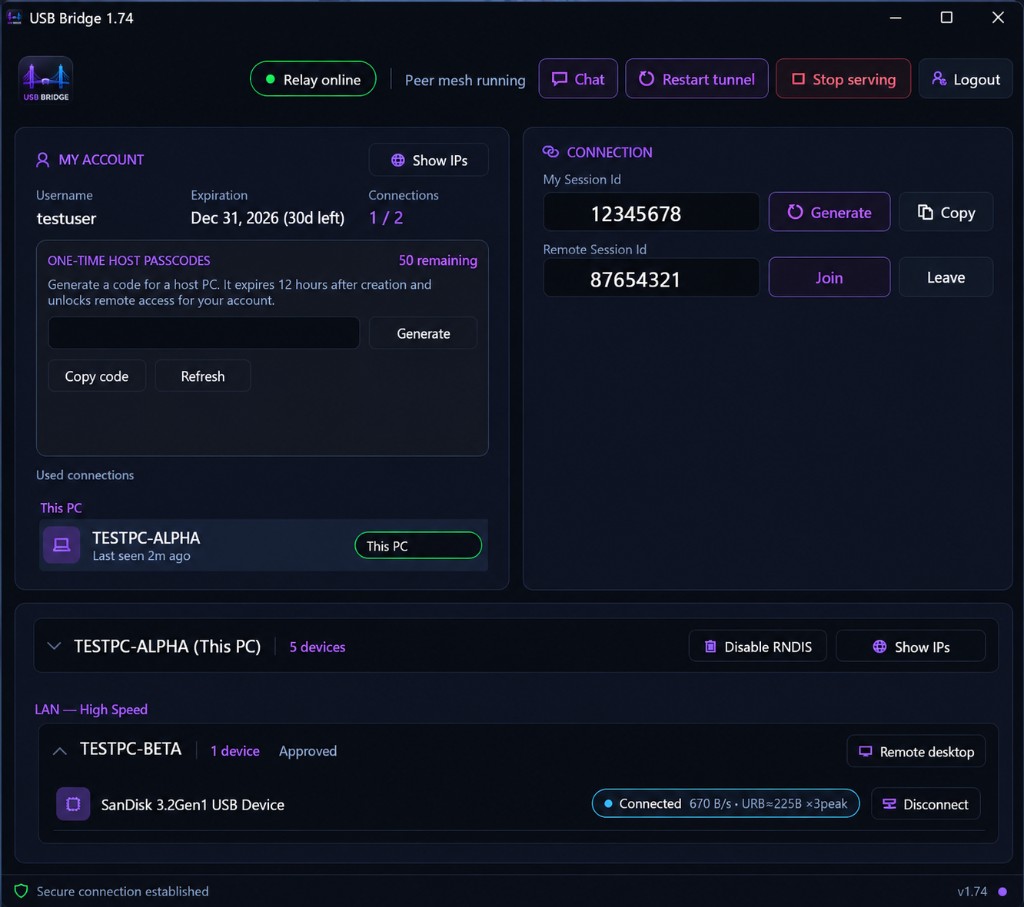
  • Account, sessions, and connection status
  • One-time host passcodes
  • Device list with share / disconnect
  • Built-in chat and tunnel controls
View Screenshots
USB Bridge 1.74 desktop app — account, connection sessions, and USB device management

Get started in minutes

Connect in Three Simple Steps

01

Install

Install USB Bridge on the computers you want to connect.

02

Sign In

Sign in to securely discover your computers and available USB devices.

03

Connect

Choose a device and connect. USB Bridge handles the connection between your computers.

One-Time Host Access

Connect a computer without sharing your account. Generate a temporary access code and securely add another computer.

Learn more

Built-in Chat

Communicate between connected computers. Two-way direct chat keeps you inside the same application.

Learn more

File Sharing

Transfer files directly between your computers when USB access is not necessary.

Learn more

Security

Built for Secure Remote Access

Your USB devices shouldn’t be exposed to just anyone. USB Bridge uses authenticated account access and controlled device connections to help protect remote sessions.

Account-Protected Access

Portal and app access sit behind your USB Bridge credentials, with signed-in sessions per user.

Control What You Share

Choose which computers and devices participate. Share, lock, or stop sharing from the desktop app.

Protected Connections

usb-bridge.com is served over HTTPS. Tunnel traffic stays on the dedicated relay, separate from the website.

One-Time Access

Host passcodes let another computer join temporarily without sharing your full account password.

Simple pricing

Choose the Plan That’s Right for You

Most Popular

Personal

$29.99 / 30 days

  • Up to 2 connected devices
  • Remote USB bridging
  • Direct chat
  • File sharing
  • 50 one-time access codes
  • 30 days of service
Get USB Bridge

Compare all plans

Secure checkoutPayPal-powered purchases through the portal.
Fast activationLicense and passcode credits apply after payment clears.
No long-term commitmentDay-based packages — renew when you need more time.
Support when you need itLive chat on the site plus email to the operator.

Got Questions?
We’ve Got Answers.

USB Bridge provides Windows installers for the main application and the one-time host passcode app. Sign in from the desktop app on each Windows PC you want to connect.
USB Bridge is built for everyday USB hardware such as storage, webcams, printers, controllers, HID devices, audio devices, and specialized hardware that appears as USB on Windows.
Access requires a signed-in USB Bridge account. The website is served over HTTPS, and device sharing is controlled from your account and the desktop app. One-time host passcodes avoid sharing your full password.
Packages include one-time host passcode credits. Generate a code when you need it, redeem it on another PC, and that machine can join without using your account password. Codes are time-limited and locked to the PC they are redeemed on.
Yes. Sign in on each computer you manage. Your plan sets how many personal connected devices you can use at once — for example, the Personal package includes up to 2 devices.

Your USB Devices Don’t Have to Stay at Your Desk.

Connect your computers. Bridge your devices. Work from anywhere.

Support

Need a hand?

Open live chat in the corner — signed-in users show their username, everyone else chats as Guest. You can also email the operator.

webmaster@usb-bridge.com